Unit stance
Unit stances, called Tactics in the game interface, control how military units move and fight. The available choices depend on the unit class. A stance may change spacing, pursuit, speed, damage, or resistance, so the same army order can behave differently when its Tactics change.
Tactics & formations
Volley is the standard ranged-infantry firing behavior; Stagger spreads eligible ranged units apart to reduce the impact of area attacks. Cover trades movement and attack for increased protection against ranged and siege damage for eligible hand infantry. Trample gives eligible hand cavalry an area attack with trade-offs to speed, damage, and incoming damage. Artillery may switch between Limber and Bombard modes to travel or fire.
Combat decisions
Use the formation and firing behavior that fits the immediate threat: spread ranged troops against artillery, use Cover to cross exposed ground when its slower movement is acceptable, and return artillery to Limber mode after firing. Check each unit’s available Tactics because not every unit has every stance.
Tactics for movement, combat and artillery
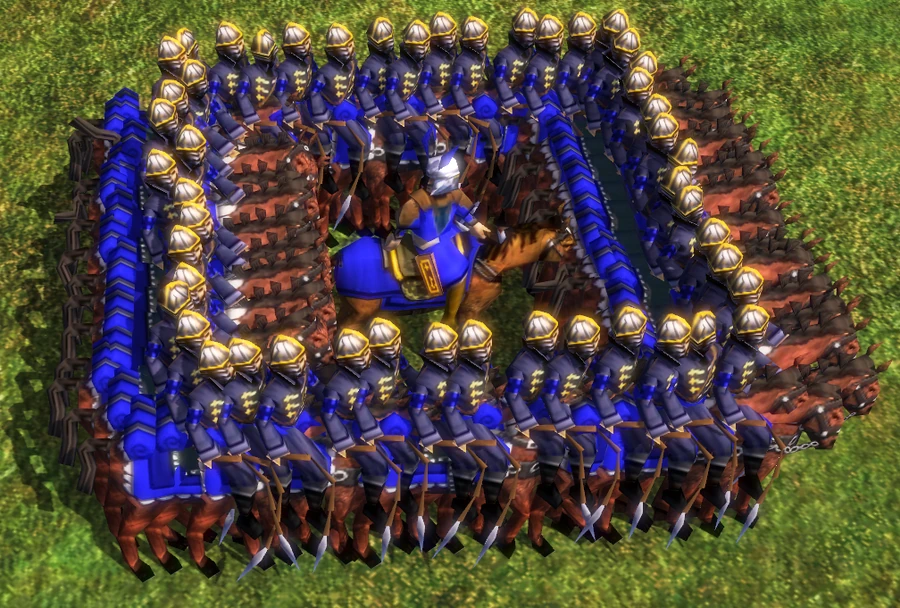
Unit stances—called Tactics in the interface—let players choose how military units move and attack. Every military unit has an active stance; economic units such as Settlers, Healers and Envoys do not use the same system. Hotkeys can be assigned to switch a selected group. Stances can change both combat statistics and formation behavior, so the correct choice depends on the target and the order the army must follow. Melee mode forces a unit to use its hand attack. It is useful when a ranged unit has a stronger melee multiplier, when a target’s ranged resistance would reduce incoming shots, or when cavalry must close to damage Artillery. Dragoons are a common example: their ranged attack suffers against a Falconet’s high ranged resistance, while melee can bypass that resistance and attack more quickly. Musketeers can also use melee against cavalry when their bonus is stronger at close range. The trade-off is exposure: ranged units must approach the target and may take hand damage before attacking. Defend mode forms a square with melee units protecting ranged units inside. All participating units need to be in Defend mode and ordered to move together; mixing cavalry and infantry does not create a single combined square. This is useful when moving an army through a dangerous area or protecting skirmishers from a cavalry charge. Stand Ground prevents units from pursuing or moving when attacked while allowing them to fire back. Use it to hold a firing line or prevent a ranged group from walking into a trap, but remember that a stationary formation can be hit by artillery. Stagger mode spaces ranged units when they move in a group. The wider formation reduces the damage from artillery splash and other area attacks, which makes it useful for ranged cavalry and many ranged infantry units. It is not the ideal mode for every target: a spread group can take longer to focus a single opponent and may occupy more space. Volley mode is the default for ranged infantry; units engage and pursue enemies within range. Some ranged units change their attack statistics depending on target distance or stance, so check unit-specific pages for exceptions such as Nizam Fusiliers. Cavalry can use Trample mode, changing its movement animation and applying an area attack as it moves through clustered enemies. Trample can damage multiple units, but normal hand attacks may be stronger against a single target. Switch back when the cavalry needs focused damage or must engage a specific counter unit. Special artillery stances also matter: Bombard mode allows a cannon to fire and move slowly, while Limber mode allows faster travel but prevents firing. Most artillery must limber before relocating and bombard before attacking; some units have different rules. Use stance changes in response to the battle rather than leaving every unit in its default state. Spread ranged units against artillery, hold ground when preserving a line, use Defend to protect ranged troops during movement and select Melee when a unit’s close-range attack is more effective. The interface calls these options Tactics, while guides often call them stances; both refer to the same Age III control feature.
Choose stance before moving the group
Stances affect how units behave after receiving a move or attack order. A group in Stand Ground will not chase a retreating enemy, which is useful for protecting a location but can cause it to miss an opportunity if left behind. A group in Volley may pursue targets and become separated from its screen. Stagger spreads ranged units against area damage, but the player should still issue focused attack commands when one target matters. Defend requires the participating units to be selected and moved together; changing only the ranged line will not create the protective square. For artillery, use Limber before crossing the map and Bombard after reaching a firing position. Limber mode cannot attack, while Bombard mode moves slowly and permits firing. Position cannons behind infantry, unlimber before the enemy can charge and return to Limber only when the location becomes unsafe. Artillery variants such as Light Cannon or Leather Cannon may have different transitions, so check the unit’s own controls.
Use melee to overcome resistance
When an enemy has high ranged resistance, switching a unit with a useful hand attack into Melee can increase effective damage. Dragoons attacking a Falconet illustrate this interaction, but the close approach also exposes them to the target’s defenders.
Check unit-specific exceptions
Some units change multipliers or range when their stance changes. Nizam Fusiliers are a clear example, with different bonuses in Volley, Stagger, Melee, Defend and Stand Ground. Use that unit’s entry when ordinary stance descriptions are not enough.
Movement and formation stances
The interface calls unit stances Tactics. They apply to military units rather than economic units such as Settlers, Healers and Envoys, and the available choices vary by unit. Defend changes how a group follows orders and forms up; Stand Ground keeps units from pursuing beyond their position; Stagger spreads eligible troops to reduce the effect of area attacks. Melee and ranged behavior select an attack mode, while Cover trades movement and attack output for added protection for eligible hand Infantry. Trample gives eligible hand Cavalry an area attack with altered movement and damage behavior. The correct setting can change the result of an order, so check the unit’s active Tactic before sending a mixed army forward.
Use Tactics for the incoming threat
Set ranged units to Stagger when facing artillery or other area damage, then reform when the threat changes. Use Stand Ground to prevent a vulnerable firing line from chasing targets into danger; Defend is more suitable when the army must move while preserving a formation. Cover can help eligible hand Infantry cross exposed ground, but its reduced speed and attack make it a poor pursuit mode. Trample can break through a dense group, yet the mode has trade-offs and should not be left on when a unit needs normal movement or precise targeting. Artillery uses Limber to travel and Bombard to fire; switch back to Limber before relocating. Hotkeys let players change selected units quickly, but every unit in the selection must support the chosen stance.