Civilization
A civilization is a player faction with its own workers, starting resources, units, buildings, and research options. A civilization’s distinctive economy and army determine how it develops from the Exploration Age through later Ages; expansions added new playable civilizations and, in some modes, alternate political paths.
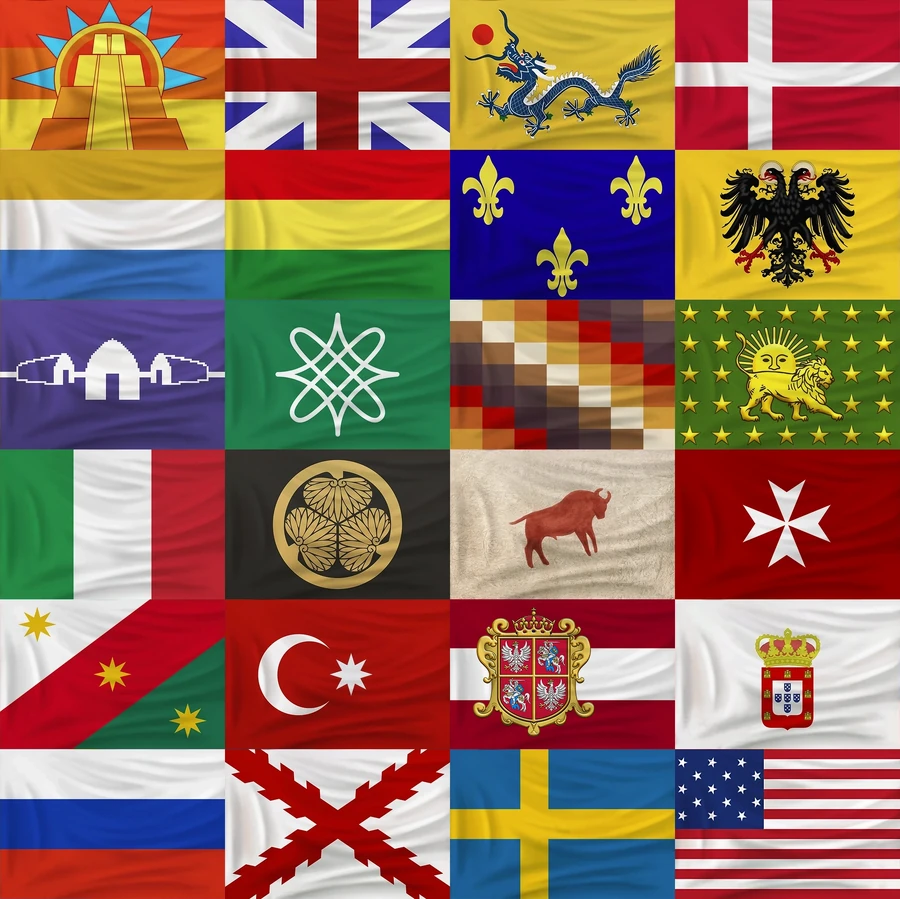
Faction identity
European civilizations commonly advance by choosing an Age-up Politician, Asian civilizations choose a Wonder, and Federal American civilizations select a Federal State. Native American civilizations use Community Plaza ceremonies for selected effects. Home City shipments add cards chosen for that civilization, while Minor civilization alliances and map conditions can add further units or technologies.
Age-up & shipment choices
Choose a civilization whose economic tools and unit roster suit the map and the match plan. Check its civilization page for exact starting resources, production, age-up choices, and version differences before copying a build order from another faction.
What makes a civilization distinct
A civilization in Age of Empires III is a complete playable roster with its own economic rules, military options, technologies, Home City, and advancement choices. The differences affect more than a small passive bonus: they determine which Villagers or alternatives gather resources, which buildings produce units, and which upgrades can be researched. A British Manor House, a Dutch Bank, a Japanese Shrine, and an African University each shape how the economy develops. Unique units and Royal Guard or National Guard upgrades add further distinctions. When comparing civilizations, begin with the economic mechanic and the age-up path, then check the units that fill the roles needed for the chosen map. A familiar unit name may have different access, statistics, or upgrades depending on the civilization.
Playable civilizations and expansion history
The roster grew through several releases. The original game introduced eight European civilizations, including the British, Dutch, French, Germans, Ottomans, Portuguese, Russians, and Spanish. The WarChiefs added the Aztecs, Haudenosaunee, and Lakota; The Asian Dynasties added China, India, and Japan. Definitive Edition introduced the Inca and Swedes, while the United States arrived as a separate civilization release. The African Royals added the Ethiopians and Hausa, and Mexico followed as its own release. Knights of the Mediterranean introduced the Italians and Maltese. The Baltic Powers added the Danes and Poles. This release history explains why civilization access, technology trees, and visual architecture vary so widely. Later additions belong to Age of Empires III and its expansions; they should not be mixed with civilizations from another Age of Empires title.
The five roster groups
The game organizes civilizations into five broad groups: Europeans, Native Americans, Asians, Africans, and Federal Americans. These groups are tied to technology and political structure, not simply to the architecture set used by buildings. The Ottomans and Russians are treated as European by the game despite spanning more than one geographic region. Native American major civilizations are distinct from minor civilizations that appear as map allies. Federal American civilizations use Federal States as an age-up choice, while African civilizations rely on Influence as part of their economic and military systems. Asian civilizations use Consulates and Wonders to obtain alliance bonuses and advance in age. These group mechanics influence how a civilization gathers resources and fields units, so the group label can be a useful first clue but never replaces reading the individual civilization's rules.
Civilization bonuses, units, and technologies
Each civilization has strengths and weaknesses expressed through its full technology tree. The British gain Settlers through Manor Houses; Dutch players use Coin-based Merchants and Banks; Germans receive Uhlans with many Home City shipments; and Portuguese gain Covered Wagons as they advance. The Japanese gather resources from Shrines and cannot hunt animals, while the Indian Villagers cost Wood and the civilization uses Sacred Fields for livestock. Chinese units train in banner armies, and the Haudenosaunee begin with a Travois that can construct buildings without the usual resource cost. These examples show why a civilization bonus should be read as part of an economic plan, not as a detached statistic. Unique units, native alliances, age-up politicians, or Federal States then determine the army's timing and available counters.
Home Cities and shipments
Every standard civilization is associated with a Home City that supplies cards during a match. Experience earned through play unlocks shipments, and the chosen deck determines which units, resources, buildings, or technologies arrive. A shipment can reinforce an army, accelerate an economy, or unlock a new unit, so the same civilization can follow different plans with different decks. Several civilization bonuses modify shipments: Spanish shipments arrive faster, while Germans attach Uhlans to many eligible shipments. Asian alliance shipments and some civilization-specific cards have their own rules. Before using a guide, check that its deck, card timing, and current Definitive Edition version match the intended strategy. Home City access also explains why some units appear as shipments rather than in ordinary production buildings.
Minor civilizations, revolutions, and campaign factions
Minor civilizations are map allies reached through Trading Posts at Native settlements. They provide alliance units or technologies but are not the same as the selectable major civilizations. Most standard civilizations can also choose a Revolution, changing their identity and access to a new military or economic package; revolutionary nations are separate outcomes rather than additional base civilization picks. Campaign-only factions and Historical Battle factions are another category: they may use a tailored roster for a scenario without being available in ordinary Skirmish. Keeping these categories distinct helps players understand why a unit or flag appears in a campaign but not in the normal civilization selection screen. For practical play, check whether an entry describes a standard civilization, minor ally, revolution, or scenario faction before assuming its units and buildings are generally available.
How to compare civilizations for a map
A useful comparison starts with the map's resources and travel routes. On a water map, examine each civilization's Dock access, naval shipments, and ability to protect fishing; on a land map, check how easily it can secure hunts, mines, and Trading Posts. Then compare the early economy with the available Commerce Age army and identify how the civilization answers Cavalry, Light Infantry, Heavy Infantry, and Artillery. A powerful unique unit may still leave a counter role uncovered, while a strong economic bonus may need time before it can pay for an army. Finally, check the age-up choices, Home City deck, and revolution options. This process describes the real choices players make when selecting a civilization and explains why a single tier label cannot capture every matchup.
Selecting a civilization for a first match
A new player can make a practical choice by looking for a civilization whose economy and units support a straightforward plan. The British can grow their workforce through Manor Houses, the French use strong Coureur des Bois, the Portuguese receive Covered Wagons as they age, and the Dutch have Banks and Merchants. These examples still require normal resource management and military production; the bonus changes the route to a working economy. Next, identify a basic anti-Cavalry unit and a ranged Infantry option, then see which cards reinforce them. A civilization with many unique mechanics can be rewarding but asks the player to track more rules. Reading the civilization's own page and its key unit pages gives a more useful starting point than choosing solely by architecture or Home City appearance.
Reading guides across versions
Civilization guides often refer to a specific expansion, balance patch, or Home City deck. The roster has changed as new downloadable civilizations and balance updates arrived, and card availability can differ between original Age of Empires III and Definitive Edition. Check the date and version before copying a build order, especially if it depends on a unit being trained at a building or on a Royal Guard upgrade. The five group labels are useful for broad mechanics, while the individual civilization page is the source for exact access. This distinction keeps campaign-only factions, minor civilizations, and revolutionary nations from being counted as ordinary selectable civilizations.
Playable faction and its match rules
A civilization is the playable faction that defines a player’s workers, economy, military roster, Home City deck and progression choices. In Age of Empires III, factions share the broad goal of gathering resources and building an army, but differ in starting units, unique buildings, age-up systems, shipments, technologies and unit counters. The same building or unit name can have different access or statistics across civilizations, so use the faction-specific entry when planning production.
Major and minor civilizations
Major civilizations are selected before a match and use a Home City and full army roster. Minor civilizations are usually accessed through Trading Posts and provide allied units or improvements rather than a complete player faction. Campaigns and historical battles can introduce scripted factions with their own objectives and unit sets. Those scenario forces should not be confused with a playable skirmish roster. Definitive Edition adds and adjusts factions over time, so check the version listed on each civilization page.