Menu views
Overview
Players open the Buy Menu during the buy period while inside a valid team Buy Zone. The interface presents item choices and prices, so a player can compare a purchase with the money left for protection, grenades or a later round. The team uses this step to finalize an opening equipment plan. The menu is part of the standard round economy; modes with different equipment rules, such as Deathmatch or Arms Race, do not use this same purchase loop.
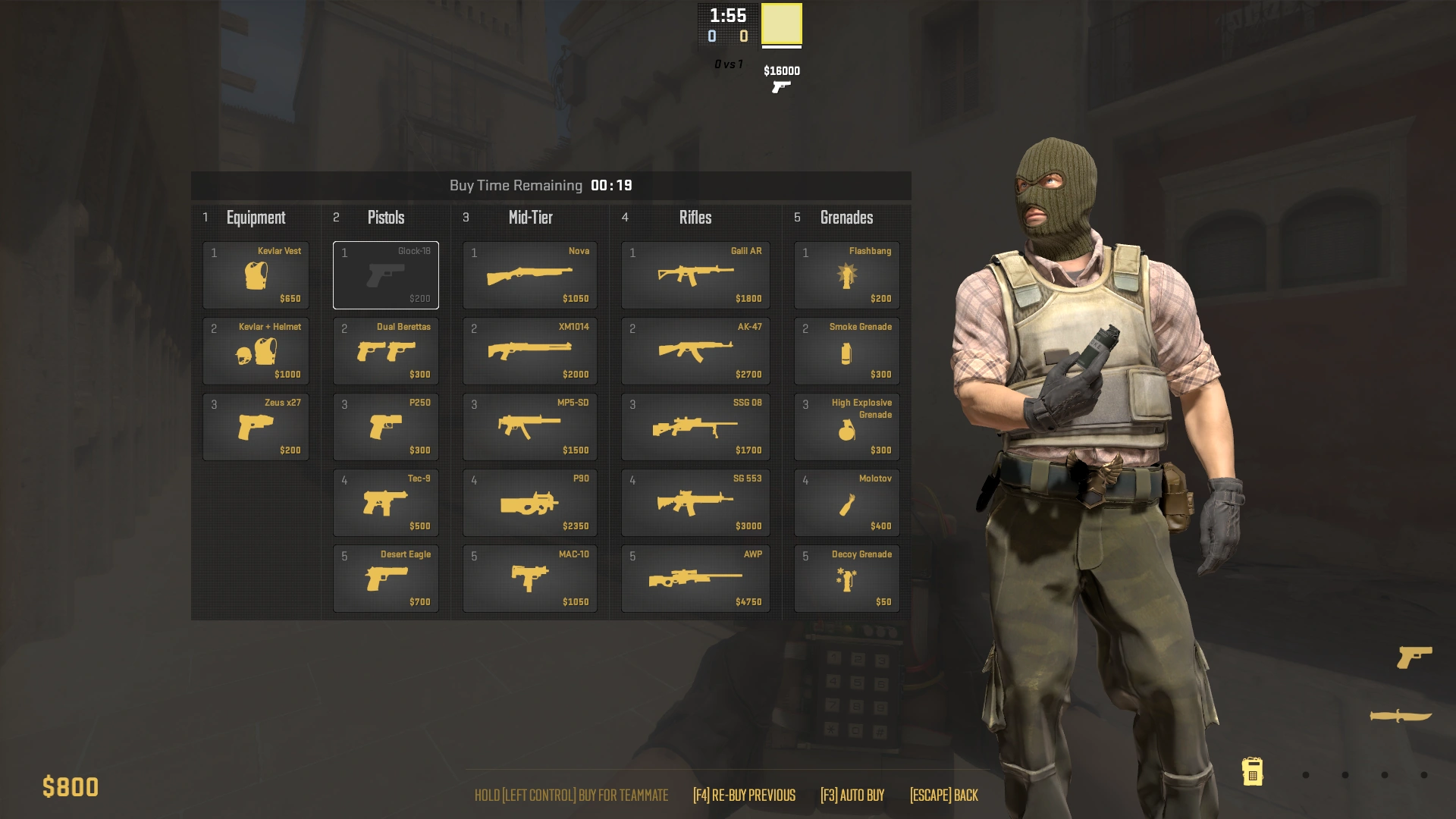
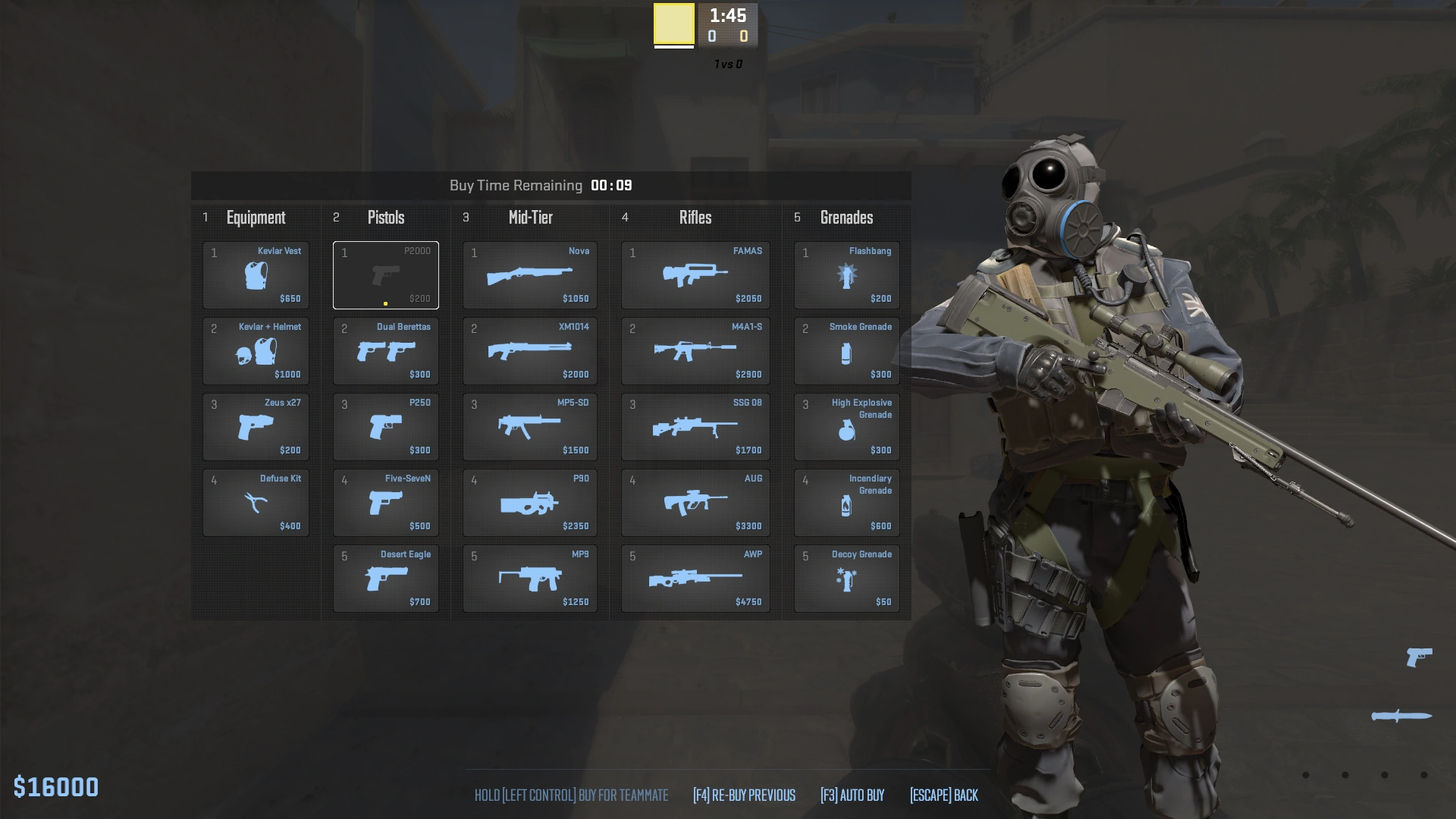
The CS2 menu is organized as a table with five sections: Equipment, Pistols (including Starting Pistol), Mid-Tier, Rifles and Grenades. Its layout groups purchases by role, while team restrictions determine which version of a weapon appears. Side columns make those restrictions visible before purchase, while item prices help players compare a full equipment package and spot whether the team still needs armor, a defuse kit, a rifle or utility. The Economy explains how round income and loss rewards affect these choices, and Loadout explains which eligible weapons a player has selected for the menu.
Purchase sections
Equipment contains the Kevlar Vest ($650), Kevlar Vest + Helmet ($1,000), Zeus x27 ($200) and, for Counter-Terrorists, the Defuse Kit ($400). This section covers protection and special round equipment as well as a close-range weapon. A defuse kit only applies to the Counter-Terrorist objective role; it is not a Terrorist purchase.
Starting Pistol shows the side’s default firearm: the Terrorist Glock-18 or the Counter-Terrorist USP-S / P2000, each listed at $200. The separate Pistols section contains Dual Berettas ($300), P250 ($300), the team-dependent Tec-9 or Five-SeveN ($500), CZ75-Auto ($500), Desert Eagle ($700) and R8 Revolver ($600). Loadout selection determines which sidearm options are available to that player.
Mid-Tier combines SMGs and heavy weapons. Its choices include MAC-10 ($1,050) or MP9 ($1,250), MP7, MP5-SD and PP-Bizon ($1,400 each), UMP-45 ($1,200), P90 ($2,350), Nova ($1,050), Sawed-Off ($1,100), MAG-7 ($1,300), XM1014 ($2,000), Negev ($1,700) and M249 ($5,200). These options occupy the same menu class even though their range, ammunition and costs differ substantially.
Rifles include the Terrorist Galil AR ($1,800) and AK-47 ($2,700), alongside the Counter-Terrorist FAMAS ($1,950), M4A4 and M4A1-S ($2,900). Shared and scoped choices include SG 553 ($3,000), AUG ($3,300), SSG 08 ($1,700), AWP ($4,750), G3SG1 and SCAR-20 ($5,000). Grenades lists the Terrorist Molotov ($400) or Counter-Terrorist Incendiary Grenade ($500), plus Decoy Grenade ($50), Flashbang ($200), HE Grenade ($300) and Smoke Grenade ($300).
Loadout slots, refunds & teammate equipment
CS2 lets a player select one Starting Pistol, four Pistols, five Mid-Tier weapons and five Rifles for the menu. These are personal selection limits, not a team-wide weapon cap. The selected roster determines what can be bought from each category; it does not remove the team-specific restrictions attached to certain items. Changing a Loadout therefore changes the menu’s available choices without changing the round objective.
During the current round, an eligible weapon purchase can be refunded if that weapon has not yet been used. This lets a player correct an accidental choice or revise a purchase while buy time remains. A refund is not a general resale system for equipment already used in play, and a teammate’s purchase cannot be returned through another player’s menu.
Small indicators show teammates’ equipment, helping a team see where money has gone and identify missing rifles, armor or utility before leaving the buy area. Use that information with voice or text Communication: for example, one player can keep a smoke while another buys a rifle, instead of duplicating utility while leaving a route uncovered. Purchase timing, team coordination and the match’s money state are therefore connected parts of a buy.
Using the menu in a round
At the start of a round, first account for the objective, the side’s required equipment and the next likely engagement. A Bomb Defusal buy may need a Counter-Terrorist defuse kit or utility to approach a site; a Terrorist buy may reserve money for the C4 Explosive carrier’s team and grenades that help cross a defended route. Compare the complete package with the money available rather than spending everything on a single weapon.
The Buy Menu is useful only while its access conditions are met. Once players leave the buy zone or the buy period ends, the normal purchase opportunity closes. Treat the visible teammate indicators as a final equipment check, then move to the map and carry out the selected plan. The menu connects Terrorists, Counter-Terrorists, weapon Weapons, utility and the Round Structure without changing how those systems work.
Categories & loadout
The CS2 buy interface groups purchases under Equipment, Pistols, Mid-Tier, Rifles and Grenades. The loadout determines which buyable firearms appear among a player’s choices, so the player has to configure weapon slots before the match. CS2 provides a fixed number of selectable loadout entries in each main weapon class; its loadout system is distinct from simply owning a skin for a gun.
Weapons are grouped by the buy interface for selection and purchasing. The article category tells the player where to find a weapon, while the collection page explains its combat role. The AK-47 is a Terrorist rifle, while the M4A4 and M4A1-S are Counter-Terrorist rifle choices. Grenades and protection use other menu sections and need room in the team budget.
Buying during a round
Players buy during the pre-round buy period while they are in the permitted purchase area. Purchases consume personal money earned through match rules. A weapon purchase is one part of the decision: armor, a defuse kit, smoke, flashes and explosives can support the actual objective. Discuss the team’s remaining funds so players do not leave a teammate isolated with an unaffordable buy.
CS2 supports refunds for eligible purchases within the permitted buying window if the player has not used the item in a way that disqualifies the refund. The menu displays eligible purchases for returning. Check the live interface, since the exact window and refund conditions depend on the current game and mode.
Planning a loadout
A pre-match loadout is the set of weapons selected to appear in the buy menu. Decide between the two Counter-Terrorist rifles, select preferred sidearms and include an option for each available category. A weapon left out of the loadout cannot be purchased from a player’s normal menu simply because it appears in the CS2 arsenal.
The team’s Economy affects which choices are possible in a given round. Plan for a full buy and for rounds with less money. Some rounds call for armor and a weapon; another may prioritize a pistol or utility to preserve a later buy. Coordinate utility responsibilities so that every player does not buy only the same grenade type.
CS2 applicability
This page describes the CS2 loadout interface. Its named categories use the game’s CS2 terminology. Global Offensive menus and their slot rules are historical and must be documented separately.
Sell-back correction (June 20, 2023)
During the Counter-Strike 2 Limited Test, the June 20 update fixed a bug in the Buy Menu sell-back feature. The note does not identify the triggering purchase sequence or the exact incorrect result, so this dated record establishes the correction without adding a speculative refund rule.
Current armor value in the Buy Menu (September 6, 2023)
The update added the player’s current armor value to the Buy Menu. This was a readout of owned armor, useful for checking equipment before purchasing more. The September 13 update later changed the Armor number to show the amount the player could buy instead; these dated descriptions refer to different Limited Test builds and must not be combined as if one display field showed both values. See Kevlar Vest and Kevlar + Helmet for the armor items themselves.
Dropped Weapons panel and next-round minimum (April 25, 2024)
On April 25, 2024, the Buy Menu gained a Dropped Weapons panel. During the buy phase it lists weapons dropped by teammates who are standing in a buy zone and allows a player to pick one up directly from the panel. This makes nearby team equipment easier to inspect while planning purchases: a player can check whether a teammate's discarded rifle or other weapon is available before spending personal funds on another gun. Availability is tied to the dropped item and the teammate being in the buy zone; it is not a remote pickup anywhere on the map.
The same update added the minimum amount of money a player is guaranteed to have in the next round to the Buy Menu title bar. That figure supports buy-or-save decisions by showing a floor for the upcoming balance rather than requiring players to calculate it from memory. It is a planning aid, not a purchase restriction or a prediction that includes every possible future kill reward. The menu's money display works alongside the Economy rules and the current round's remaining purchase opportunities.